Carolyn Abram - Facebook For Dummies
Здесь есть возможность читать онлайн «Carolyn Abram - Facebook For Dummies» — ознакомительный отрывок электронной книги совершенно бесплатно, а после прочтения отрывка купить полную версию. В некоторых случаях можно слушать аудио, скачать через торрент в формате fb2 и присутствует краткое содержание. Жанр: unrecognised, на английском языке. Описание произведения, (предисловие) а так же отзывы посетителей доступны на портале библиотеки ЛибКат.

- Название:Facebook For Dummies
- Автор:
- Жанр:
- Год:неизвестен
- ISBN:нет данных
- Рейтинг книги:5 / 5. Голосов: 1
-
Избранное:Добавить в избранное
- Отзывы:
-
Ваша оценка:
Facebook For Dummies: краткое содержание, описание и аннотация
Предлагаем к чтению аннотацию, описание, краткое содержание или предисловие (зависит от того, что написал сам автор книги «Facebook For Dummies»). Если вы не нашли необходимую информацию о книге — напишите в комментариях, мы постараемся отыскать её.
In a chatty, straightforward style, your friendly hosts, Carolyn Abram and Amy Karasavas—both former Facebook employees—help you get settled in with the basics, like setting up your profile and adding content, as well as protecting your privacy when you want to decide who can and can't see your posts. They then show you how to get involved as you add new friends, toggle your newsfeed, shape your timeline story, join groups, and more. They even let you in on ways to go pro and use Facebook for work, such as building a promo page and showing off your business to the world. Once you come out of your virtual shell, there'll be no stopping you!
Build your profile and start adding friends Send private messages and instant notes Share your memories Tell stories about your day Set your privacy and curate your news feed Don't be a wallflower: with this book you have the ideal icebreaker to get the party started so you can join in with all the fun!
Facebook For Dummies — читать онлайн ознакомительный отрывок
Ниже представлен текст книги, разбитый по страницам. Система сохранения места последней прочитанной страницы, позволяет с удобством читать онлайн бесплатно книгу «Facebook For Dummies», без необходимости каждый раз заново искать на чём Вы остановились. Поставьте закладку, и сможете в любой момент перейти на страницу, на которой закончили чтение.
Интервал:
Закладка:
To add a profile picture from your hard drive, make sure you have a photo you want to use saved somewhere you can find it, and follow these steps:
1 Click the blue Add Picture button.This opens a window for browsing your computer’s hard drive. Use it to navigate to wherever you saved the photo you want to use as a profile picture.
2 Select your desired photo and click Choose, OK, or Open.This brings you back to where you started, except now there’s a preview of your new profile picture. You can choose to keep this photo or upload a different one.
 We talk more about your profile picture and the many ways it's used on Facebook in Chapter 5, but here are a few quick tips on selecting a profile picture:
Make a good first impression. Your profile picture is how you choose to represent yourself and one of the first ways people interact with your timeline. Most people choose pictures that are flattering or represent what’s important to them. Sometimes, profile pictures include other people — friends or significant others. Other times, the location matters. If the first photo you see of someone is at the beach rather than, say, at a party or in an office, you may draw different conclusions about that person. What picture represents you?
Consider who will see your profile picture. By default, your profile picture appears in search results that are visible to all of Facebook and can even be made available to the larger Internet population. So, generally, people who search for your name can see that picture. Make sure it's something you're comfortable with everyone seeing.
Choose a photo you like. As you use Facebook, you'll wind up seeing your own photo quite often. Small versions appear wherever you make a comment, post something, or are part of a group. So choose a photo you like looking at.
Realize that you’re not stuck with the photo. You can easily change your profile picture at any time. Is it the middle of winter, and that photo of you hiking last summer is just too depressing to look at? No problem; simply edit your profile picture. After you’ve uploaded your profile picture, you’ll also see an option to make the picture temporary for any period of time between 1 hour and forever. If you set it for a length of time with an end date, your profile picture will simply revert to the previous profile picture on that date. See Chapter 5for details.
Step 2: Finding your friends
Now that your profile picture is in place, it’s time to find your friends. Without friends, Facebook can feel a bit like going to an amusement park alone. Sure, the rides were fun and the food was greasy, but no one was there to appreciate it with you.
 You have many ways to find friends on Facebook, as you discover in Chapter 8, along with understanding what friendship means on Facebook.
To find your friends, follow these steps:
1 Enter a name or email in the search field.Facebook might show you a drop-down list with possible matches. You can choose someone from the list or click the Return or Enter key to search for the name you typed in the search field.
2 Browse the results.Facebook shows you a list of people with exact or similar names to what you typed, as shown in Figure 2-3. To ensure that you’ve found the correct person, click the name and check out that person's timeline and profile picture. FIGURE 2-3:Find your friends early and often.
3 Use the filters in the left sidebar.If you’re looking for someone with a common name, the list of suggestions might seem endless. Never fear! Facebook gives you some handy-dandy filters in the left sidebar to narrow your search. Your options are to filter by Friends of Friends (particularly useful if you have mutual friends), City, Education, or Work.
4 Send a friend request.After you have determined that this is your friend, click the Add Friend icon to the right or below the person’s name.
5 Repeat, repeat, repeat.Keep searching and keep friending. We discuss more ways to find friends in Chapter 8, but this is a good way to get started. Depending on how you joined Facebook, you may see a few friend suggestions waiting for you below the friend search tool. These are people that Facebook thinks you may know. If you know them, great — go ahead and send a friend request. If not, you can click the Remove button to get rid of the suggestion. Sometimes, you might find friends in the search results but you don’t see an option to send them a friend request. If this is the case, they might have set their privacy to allow requests only from friends of friends or people who are already Facebook friends with someone that they’re Facebook friends with. Try sending them a message (see Chapter 9) to let them know you’d like to be Facebook friends.
Step 3: Getting to know your privacy settings
Click the blue Take a Privacy Tour button to learn more about your privacy settings and options. We won’t get into Facebook’s many privacy settings here. For the skinny on all things privacy, head to Chapter 6.
These same steps apply if you sign up for a Facebook account using your mobile phone. The only difference is that you may be able to upload your profile picture and find friends before being prompted to confirm your account.
Introducing Your New Home Page
After you complete the last step in the preceding section, you’ll see your Home page in all its glory. The Home page (see Figure 2-4) is what you see each time you log in to Facebook.
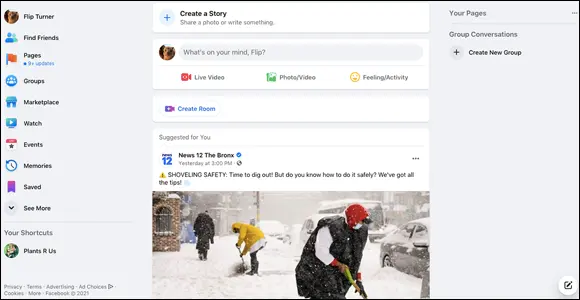
FIGURE 2-4:Home sweet Home page.
While some parts of the Home page remain the same (such as the top bar and left sidebar), the bulk of what you see is constantly changing. This is because the Home page contains the News Feed, which is essentially a real-time newspaper filled with updates showing you what your friends are posting, sharing, and talking about on Facebook.
At the beginning of this chapter, we point out that Facebook gets exponentially better after you have friends. Until your friends respond to your requests, you may not see much on the Home page except prompts to learn more about Facebook, find more friends, or create your own post. After you add the people you know as friends, take a break. Stretch. Go for a walk. Drink some water. Come back over the next few days to see the interesting photos, status updates, and links your friends are sharing.
As you navigate Facebook for the first time, you may notice small boxes popping up in different parts of the screen, such as the one in Figure 2-5. Don’t ignore these! They are trying to teach you tips and tricks to get you comfortable using Facebook.
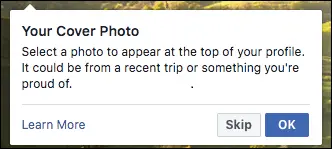
FIGURE 2-5:Little boxes like this one point out how and why to use different Facebook features.
AM I TOO OLD FOR FACEBOOK?
Интервал:
Закладка:
Похожие книги на «Facebook For Dummies»
Представляем Вашему вниманию похожие книги на «Facebook For Dummies» списком для выбора. Мы отобрали схожую по названию и смыслу литературу в надежде предоставить читателям больше вариантов отыскать новые, интересные, ещё непрочитанные произведения.












Обсуждение, отзывы о книге «Facebook For Dummies» и просто собственные мнения читателей. Оставьте ваши комментарии, напишите, что Вы думаете о произведении, его смысле или главных героях. Укажите что конкретно понравилось, а что нет, и почему Вы так считаете.