Mark Murphy - Beginning Android
Здесь есть возможность читать онлайн «Mark Murphy - Beginning Android» весь текст электронной книги совершенно бесплатно (целиком полную версию без сокращений). В некоторых случаях можно слушать аудио, скачать через торрент в формате fb2 и присутствует краткое содержание. Город: New York, Год выпуска: 2009, ISBN: 2009, Издательство: Apress, Жанр: Программирование, на английском языке. Описание произведения, (предисловие) а так же отзывы посетителей доступны на портале библиотеки ЛибКат.
- Название:Beginning Android
- Автор:
- Издательство:Apress
- Жанр:
- Год:2009
- Город:New York
- ISBN:978-1-4302-2420-4
- Рейтинг книги:3 / 5. Голосов: 1
-
Избранное:Добавить в избранное
- Отзывы:
-
Ваша оценка:
Beginning Android: краткое содержание, описание и аннотация
Предлагаем к чтению аннотацию, описание, краткое содержание или предисловие (зависит от того, что написал сам автор книги «Beginning Android»). Если вы не нашли необходимую информацию о книге — напишите в комментариях, мы постараемся отыскать её.
Dear Reader,
First, welcome to the world of Android! We’re entering a new era of mobile application development, one marked by open platforms and open source, to take ‘walled gardens’ and make them green houses for any and all to participate in. Android is relatively easy for developers, and I believe that this innovation will help generate a large ecosystem of developers and consumers within a very short time. This means that budding developers such as yourself will have many opportunities to design and build your own applications and you’ll have a huge and hungry customer base.
Second, welcome to the book! Its purpose is to start you on your way with building Android applications, and to help you master the learning curve. Android is already a rich framework, comparable in many ways to the richness Android of desktop Java environments. This means that there is a lot of cool stuff for you to pick up along your journey in order to create the slickest, most useful apps Android you can imagine.
The source code for the code samples in this book is all available from the Apress site, so you can stay as hands-on and practical as you like while I introduce you to the core of Android, and invite you to experiment with the various classes and APIs we’ll be looking at. By the time you’ve finished this book, you’ll be creating your own Android applications and asking yourself what your next great application will be…!
Enjoy! Mark Murphy
Beginning Android — читать онлайн бесплатно полную книгу (весь текст) целиком
Ниже представлен текст книги, разбитый по страницам. Система сохранения места последней прочитанной страницы, позволяет с удобством читать онлайн бесплатно книгу «Beginning Android», без необходимости каждый раз заново искать на чём Вы остановились. Поставьте закладку, и сможете в любой момент перейти на страницу, на которой закончили чтение.
Интервал:
Закладка:
WebView browser;
@Override
publicvoid onCreate(Bundle icicle) {
super. onCreate(icicle);
setContentView(R.layout.main);
browser = (WebView) findViewById(R.id.webkit);
browser. loadUrl("http://commonsware.com");
}
}
The only unusual bit with this edition of onCreate()is that we invoke loadUrl()on the WebViewwidget, to tell it to load a Web page (in this case, the home page of some random firm).
However, we also have to make one change to AndroidManifest.xml, requesting permission to access the Internet:
package="com.commonsware.android.webkit">
If we fail to add this permission, the browser will refuse to load pages.
The resulting activity looks like a Web browser, just with hidden scrollbars (see Figure 13-1).
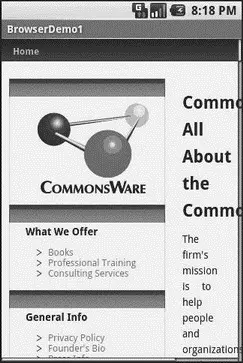
Figure 13-1. The Browser1 sample application
As with the regular Android browser, you can pan around the page by dragging it, while the directional pad moves you around all the focusable elements on the page.
What is missing is all the extra accouterments that make up a Web browser, such as a navigational toolbar.
Now, you may be tempted to replace the URL in that source code with something else, such as Google’s home page or another page that relies upon Javascript. By default Javascript is turned off in WebViewwidgets. If you want to enable Javascript, call getSettings().setJavaScriptEnabled(true);on the WebViewinstance.
Loading It Up
There are two main ways to get content into the WebView. One, shown earlier, is to provide the browser with a URL and have the browser display that page via loadUrl(). The browser will access the Internet through whatever means are available to that specific device at the present time (WiFi, cellular network, Bluetooth-tethered phone, well-trained tiny carrier pigeons, etc.).
The alternative is to use loadData(). Here, you supply the HTML for the browser to view. You might use this to
• display a manual that was installed as a file with your application package
• display snippets of HTML you retrieved as part of other processing, such as the description of an entry in an Atom feed
• generate a whole user interface using HTML, instead of using the Android widget set
There are two flavors of loadData(). The simpler one allows you to provide the content, the MIME type, and the encoding, all as strings. Typically, your MIME type will be text/html and your encoding will be UTF-8for ordinary HTML.
For instance, if you replace the loadUrl()invocation in the previous example with the following code, you get the result shown in Figure 13-2.
browser. loadData("
Hello, world!",
"text/html", "UTF-8");
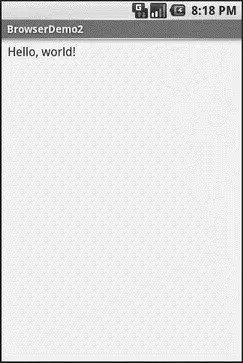
Figure 13-2. The Browser2 sample application
This is also available as a fully-buildable sample, as WebKit/Browser2.
Navigating the Waters
As previously mentioned, there is no navigation toolbar with the WebView widget. This allows you to use it in places where such a toolbar would be pointless and a waste of screen real estate. That being said, if you want to offer navigational capabilities, you can, but you have to supply the UI.
WebViewoffers ways to perform garden-variety browser navigation, including the following:
• reload()to refresh the currently-viewed Web page
• goBack()to go back one step in the browser history, and canGoBack()to determine if there is any history to go back to
• goForward()to go forward one step in the browser history, and canGoForward()to determine if there is any history to go forward to
• goBackOrForward()to go backward or forward in the browser history, where a negative number as an argument represents a count of steps to go backward, and a positive number represents how many steps to go forward
• canGoBackOrForward()to see if the browser can go backward or forward the stated number of steps (following the same positive/negative convention as goBackOrForward())
• clearCache()to clear the browser resource cache and clearHistory()to clear the browsing history
Entertaining the Client
If you are going to use the WebViewas a local user interface (vs. browsing the Web), you will want to be able to get control at key times, particularly when users click on links. You will want to make sure those links are handled properly, either by loading your own content back into the WebView, by submitting an Intent to Android to open the URL in a full browser, or by some other means (see Chapter 25).
Your hook into the WebViewactivity is via setWebViewClient(), which takes an instance of a WebViewClientimplementation as a parameter. The supplied callback object will be notified of a wide range of activities, ranging from when parts of a page have been retrieved ( onPageStarted(), etc.) to when you, as the host application, need to handle certain user-or circumstance-initiated events, such as onTooManyRedirects()and onReceivedHttpAuthRequest(), etc.
A common hook will be shouldOverrideUrlLoading(), where your callback is passed a URL (plus the WebViewitself) and you return true if you will handle the request or falseif you want default handling (e.g., actually fetch the Web page referenced by the URL). In the case of a feed reader application, for example, you will probably not have a full browser with navigation built into your reader, so if the user clicks a URL, you probably want to use an Intentto ask Android to load that page in a full browser. But, if you have inserted a “fake” URL into the HTML, representing a link to some activity-provided content, you can update the WebViewyourself.
For example, let’s amend the first browser example to be a browser-based equivalent of our original example: an application that, upon a click, shows the current time.
From WebKit/Browser3, here is the revised Java:
public classBrowserDemo3 extends Activity {
WebView browser;
@Override
publicvoid onCreate(Bundle icicle) {
super. onCreate(icicle);
setContentView(R.layout.main);
browser = (WebView) findViewById(R.id.webkit);
browser. setWebViewClient( new Callback());
loadTime();
}
void loadTime() {
String page="
"
+ new Date(). toString() + "
Интервал:
Закладка:
Похожие книги на «Beginning Android»
Представляем Вашему вниманию похожие книги на «Beginning Android» списком для выбора. Мы отобрали схожую по названию и смыслу литературу в надежде предоставить читателям больше вариантов отыскать новые, интересные, ещё непрочитанные произведения.








Обсуждение, отзывы о книге «Beginning Android» и просто собственные мнения читателей. Оставьте ваши комментарии, напишите, что Вы думаете о произведении, его смысле или главных героях. Укажите что конкретно понравилось, а что нет, и почему Вы так считаете.