Debra Cameron - Learning GNU Emacs, 3rd Edition
Здесь есть возможность читать онлайн «Debra Cameron - Learning GNU Emacs, 3rd Edition» весь текст электронной книги совершенно бесплатно (целиком полную версию без сокращений). В некоторых случаях можно слушать аудио, скачать через торрент в формате fb2 и присутствует краткое содержание. Год выпуска: 2004, ISBN: 2004, Издательство: O'Reilly Media, Жанр: Программы, Программирование, на английском языке. Описание произведения, (предисловие) а так же отзывы посетителей доступны на портале библиотеки ЛибКат.
- Название:Learning GNU Emacs, 3rd Edition
- Автор:
- Издательство:O'Reilly Media
- Жанр:
- Год:2004
- ISBN:0-596-00648-9
- Рейтинг книги:3 / 5. Голосов: 1
-
Избранное:Добавить в избранное
- Отзывы:
-
Ваша оценка:
Learning GNU Emacs, 3rd Edition: краткое содержание, описание и аннотация
Предлагаем к чтению аннотацию, описание, краткое содержание или предисловие (зависит от того, что написал сам автор книги «Learning GNU Emacs, 3rd Edition»). Если вы не нашли необходимую информацию о книге — напишите в комментариях, мы постараемся отыскать её.
, 3rd Edition tells readers how to get started with the GNU Emacs editor. It is a thorough guide that will also "grow" with you: as you become more proficient, this book will help you learn how to use Emacs more effectively. It takes you from basic Emacs usage (simple text editing) to moderately complicated customization and programming.The third edition of
describes Emacs 21.3 from the ground up, including new user interface features such as an icon-based toolbar and an interactive interface to Emacs customization. A new chapter details how to install and run Emacs on Mac OS X, Windows, and Linux, including tips for using Emacs effectively on those platforms.
, third edition, covers:
• How to edit files with Emacs
• Using the operating system shell through Emacs
• How to use multiple buffers, windows, and frames
• Customizing Emacs interactively and through startup files
• Writing macros to circumvent repetitious tasks
• Emacs as a programming environment for Java, C++, and Perl, among others
• Using Emacs as an integrated development environment (IDE)
• Integrating Emacs with CVS, Subversion and other change control systems for projects with multiple developers
• Writing HTML, XHTML, and XML with Emacs
• The basics of Emacs Lisp
The book is aimed at new Emacs users, whether or not they are programmers. Also useful for readers switching from other Emacs implementations to GNU Emacs.
Learning GNU Emacs, 3rd Edition — читать онлайн бесплатно полную книгу (весь текст) целиком
Ниже представлен текст книги, разбитый по страницам. Система сохранения места последней прочитанной страницы, позволяет с удобством читать онлайн бесплатно книгу «Learning GNU Emacs, 3rd Edition», без необходимости каждый раз заново искать на чём Вы остановились. Поставьте закладку, и сможете в любой момент перейти на страницу, на которой закончили чтение.
Интервал:
Закладка:
6.8.1.1 Example
Here's an example of a macro that puts a business letter template on the screen and uses recursive edits to let you type your return address, the recipient's name and address, and the date. Because the brackets on the mode line are a pretty subtle clue to what you are going to type, we'll give the user of this macro explicit instructions about what to type. Table 6-3provides these instructions.
Table 6-3. Steps for creating a business letter macro
| Keystrokes | Action |
|---|---|
| F3 or C-x ( | Start keyboard macro definition. |
| M-5 Enter | Put in 5 blank lines. |
| Type your address and press C-M-c | Display Type your address and press C-M-con the screen. |
| C-a | Move to the beginning of the line. |
| C-u C-x q | Enter a recursive edit, during which the keystrokes you type are not recorded as part of the macro. |
| C-M-c | Exit the recursive edit. |
| C-e | Move to the end of the line. |
| M-5 Enter | Move the cursor down 5 lines. |
| Type recipient name and address and press C-M-c | Display Type recipient name and address and press C-M-con the screen. |
| C-a | Move to the beginning of the line. |
| C-u C-x q | Enter a recursive edit. |
| C-M-c | Exit the recursive edit. |
| C-e | Move to the end of the line. |
| M-5 Enter | Move the cursor down 5 lines. |
| Type date and press C-M-c | Display Type date and press C-M-con the screen. |
| C-a | Move to the beginning of the line. |
| C-u C-x q | Enter a recursive edit. |
| C-M-c | Exit the recursive edit. |
| C-e | Move to the end of the line. |
| M-5 Enter | Move the cursor down 5 lines. |
| Dear Space | Display Dearon the screen. |
| F4 or C-x ) | End keyboard macro definition. |
The following screens show what the macro defined in Table 6-3looks like when you run it.
Type: F4
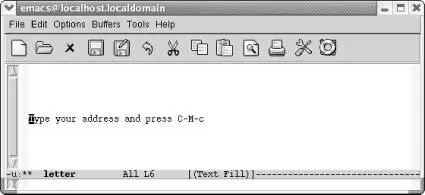
The macro pauses so that you can type your address.
Type your address and press: C-M-c
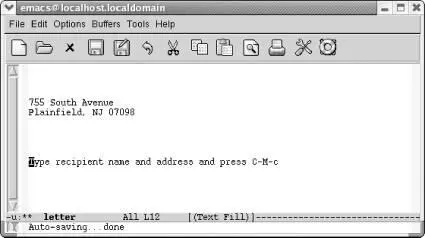
The macro pauses so you can type the recipient's name and address.
Type the recipient's name and address and press: C-M-c
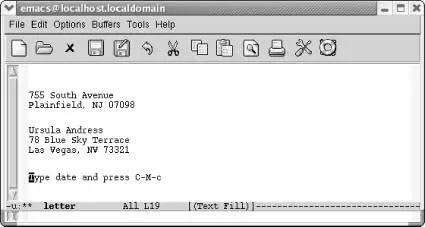
The macro pauses so you can type the date.
Type the date and press: C-M-c
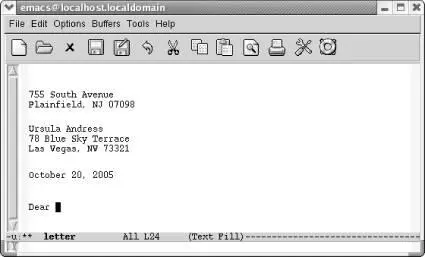
The macro finishes by typing the opening for the letter.
Now the macro has finished editing; you can type the recipient's name and then the body of the letter, and of course you can go back and edit any of the information you've already filled in.
6.8.2 Adding a Query to a Macro
The more complex the task your macro performs, the more difficult it is to make the macro general enough to work in every case. Although macros can do a lot of things, they aren't programs: you can't have ifstatements, loops, and the other things you associate with a program. In particular, a macro can't get input from the user and then take some action on the basis of that input.
However, one feature lets a macro get input, in a limited way, from the user. You can create a macro that queries the user while it is running; it works much like a query-replace. To create this kind of a macro, type C-x qwhen you reach the point in the macro definition where you want the macro to query the user. Nothing happens immediately; go on defining the macro as you normally would.
Things get interesting later, when you execute the macro. When it gets to the point in the macro where you typed C-x q, Emacs prints a query in the minibuffer:
Proceed with macro? (y, n, RET, C-l, C-r)
The responses listed here are analogous to those in query-replace:
• Pressing ymeans to continue and go on to the next repetition, if any.
• Pressing nmeans to stop executing the macro but go on to the next repetition, if any.
• Pressing Entermeans to stop executing the macro and cancel any repetitions.
• Pressing C-rstarts a recursive edit, which lets you do any editing or moving around you may want to and then resume the macro when you exit the recursive edit. To exit a recursive edit, press C-M-c. Emacs again asks if you want to proceed with the macro, and you type yfor yes or nor Enterfor no.
• Pressing C-lputs the line the cursor is on in the middle of the screen (this is good for getting a feel for the context). Similar to C-r, Emacs again asks if you want to proceed with the macro, and you have to answer y, n, or Enter.
• Pressing C-g(although not listed as an option) cancels the query and the macro; it is similar to pressing Enter.
6.8.2.1 Example
Let's say that you write a macro that copies comments from a program to another buffer. The comments in our program are preceded by a slash, so you start the macro with a search for a slash. However, not all comments are worth copying. Following the search with a query lets you decide case by case whether the search has found a comment you want to copy. Table 6-4shows a macro to copy comments to another buffer.
Table 6-4. Comment-copying macro with a query
| Keystrokes | Action |
|---|---|
| F3 | Start the macro definition. |
| C-s / | Search for a slash. |
| Enter | Stop the search when it is successful. |
| C-x q | Insert a query in the macro; Emacs asks you if you want to proceed at this point when you run the macro. |
| M-f | Move forward one word. |
| M-b | Move to the beginning of this word. |
| C-Space | Set the mark. |
| C-e | Move to the end of the line. |
| C-f | Move forward one character. |
| M-w | Copy the comment to the kill ring. |
| C-x b comments | Move to a buffer called comments. |
| C-y | Insert the comment in the buffer. |
| C-x b | Move back to the original buffer. |
| F4 | End the macro definition. |
6.9 Executing Macros on a Region
Интервал:
Закладка:
Похожие книги на «Learning GNU Emacs, 3rd Edition»
Представляем Вашему вниманию похожие книги на «Learning GNU Emacs, 3rd Edition» списком для выбора. Мы отобрали схожую по названию и смыслу литературу в надежде предоставить читателям больше вариантов отыскать новые, интересные, ещё непрочитанные произведения.











Обсуждение, отзывы о книге «Learning GNU Emacs, 3rd Edition» и просто собственные мнения читателей. Оставьте ваши комментарии, напишите, что Вы думаете о произведении, его смысле или главных героях. Укажите что конкретно понравилось, а что нет, и почему Вы так считаете.