Wei-Meng Lee - C# 2008 Programmer's Reference
Здесь есть возможность читать онлайн «Wei-Meng Lee - C# 2008 Programmer's Reference» весь текст электронной книги совершенно бесплатно (целиком полную версию без сокращений). В некоторых случаях можно слушать аудио, скачать через торрент в формате fb2 и присутствует краткое содержание. Город: Indianapolis, Год выпуска: 2009, ISBN: 2009, Издательство: Wiley Publishing, Inc., Жанр: Программирование, на английском языке. Описание произведения, (предисловие) а так же отзывы посетителей доступны на портале библиотеки ЛибКат.
- Название:C# 2008 Programmer's Reference
- Автор:
- Издательство:Wiley Publishing, Inc.
- Жанр:
- Год:2009
- Город:Indianapolis
- ISBN:978-0-470-28581-7
- Рейтинг книги:4 / 5. Голосов: 1
-
Избранное:Добавить в избранное
- Отзывы:
-
Ваша оценка:
C# 2008 Programmer's Reference: краткое содержание, описание и аннотация
Предлагаем к чтению аннотацию, описание, краткое содержание или предисловие (зависит от того, что написал сам автор книги «C# 2008 Programmer's Reference»). Если вы не нашли необходимую информацию о книге — напишите в комментариях, мы постараемся отыскать её.
C# 2008 Programmer's Reference — читать онлайн бесплатно полную книгу (весь текст) целиком
Ниже представлен текст книги, разбитый по страницам. Система сохранения места последней прочитанной страницы, позволяет с удобством читать онлайн бесплатно книгу «C# 2008 Programmer's Reference», без необходимости каждый раз заново искать на чём Вы остановились. Поставьте закладку, и сможете в любой момент перейти на страницу, на которой закончили чтение.
Интервал:
Закладка:
Let's take a look at method syntax and how it works. First, the expression:
(n => n % 2 == 1)
is known as the lambda expression. The =>is the lambda operator. You read it as "goes to," so this expression reads as "n goes to n modulus 2 equals to 1." Think of this lambda expression as a function that accepts a single input parameter, contains a single statement, and returns a value, like this:
static bool function(int n) {
return (n % 2 == 1);
}
The compiler automatically infers the type of n(which is intin this case because numsis an intarray) in the lambda expression. However, you can also explicitly specify the type of n, like this:
IEnumerable oddNums =
nums.Where((int n) => n % 2 == 1).OrderByDescending(n => n);
The earlier example of the string array can also be rewritten using the method syntax as follows:
string[] allNames = new string[] {
"Jeffrey", "Kirby", "Gabriel",
"Philip", "Ross", "Adam",
"Alston", "Warren", "Garfield"
};
var foundNames =
allNames.Where(name = name.StartsWith("G") &&
name.EndsWith("l"));
Which syntax should you use? Here's some information regarding the two syntaxes:
□ There is no performance difference between the method syntax and the query syntax.
□ The query syntax is much more readable, so use it whenever possible.
□ Use the method syntax for cases where there is no query syntax equivalent. For example, the Countand Maxmethods have no query equivalent syntax.
LINQ and Extension Methods
Chapter 4 explored extension methods and how you can use them to extend functionality to an existing class without needing to subclass it. One of the main reasons why the extension method feature was incorporated into the C# 3.0 language was because of LINQ.
Consider the earlier example where you have an array called allNamescontaining an array of strings. In .NET, objects that contain a collection of objects must implement the IEnumerableinterface, so the allNamesvariable implicitly implements the IEnumerableinterface, which only exposes one method — GetEnumerator. But when you use IntelliSense in Visual Studio 2008 to view the list of methods available in the allNamesobject, you see a list of additional methods, such as Select, Take, TakeWhile, Where, and so on (see Figure 14-2).
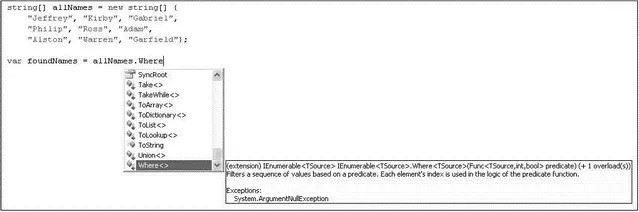
Figure 14-2
In C# 3.0, all these additional methods are known as extension methods , and they are extended to objects that implement the IEnumerable interface. These extension methods are the LINQ standard query operators.
In Visual Studio 2008, all extension methods are denoted by an additional arrow icon, as shown in Figure 14-3.
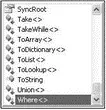
Figure 14-3
To add extension methods to objects implementing the IEnumerable interface, you need a reference to System.Core.dll and import the namespace by specifying the namespace:
using System.Linq;
The following table lists the LINQ standard query operators.
| Operator Type | Operator Name |
|---|---|
| Aggregation | Aggregate, Average, Count, LongCount, Max, Min, Sum |
| Conversion | Cast, OfType, ToArray, ToDictionary, ToList, ToLookup, ToSequence |
| Element | DefaultIfEmpty, ElementAt, ElementAtOrDefault, First, FirstOrDefault, Last, LastOrDefault, Single, SingleOrDefault |
| Equality | EqualAll |
| Generation | Empty, Range, Repeat |
| Grouping | GroupBy |
| Joining | GroupJoin, Join |
| Ordering | OrderBy, ThenBy, OrderByDescending, ThenByDescending, Reverse |
| Partitioning | Skip, SkipWhile, Take, TakeWhile |
| Quantifiers | All, Any, Contains |
| Restriction | Where |
| Selection | Select, SelectMany |
| Set | Concat, Distinct, Except, Intersect, Union |
The query variable itself only stores the query; it does not execute the query or store the result.
Take another look at the preceding example:
int[] nums = {
12, 34, 10, 3, 45, 6, 90, 22, 87, 49, 13, 32
};
var oddNums = nums.Where
(n => n % 2 == 1).OrderByDescending(n => n);
The oddNumsvariable simply stores the query (not the result of the query). The query is only executed when you iterate over the query variable, like this:
foreach (int n in oddNums)
Console.WriteLine(n);
This concept is known as deferred execution, and it means that every time you access the query variable, the query is executed again. This is useful because you can just create one query and every time you execute it you will always get the most recent result.
To prove that deferred execution really works, the following program first defines a query and then prints out the result using a foreachloop. Twenty is added to each element in the array, and then the foreachloop is executed again.
using System;
using System.Collections.Generic;
using System.Linq;
using System.Text;
namespace ConsoleApplication5 {
class Program {
static void Main(string[] args) {
int[] nums = {
12, 34, 10, 3, 45, 6, 90, 22, 87, 49, 13, 32
};
var oddNums =
nums.Where(n => n % 2 == 1).OrderByDescending(n => n);
Интервал:
Закладка:
Похожие книги на «C# 2008 Programmer's Reference»
Представляем Вашему вниманию похожие книги на «C# 2008 Programmer's Reference» списком для выбора. Мы отобрали схожую по названию и смыслу литературу в надежде предоставить читателям больше вариантов отыскать новые, интересные, ещё непрочитанные произведения.










Обсуждение, отзывы о книге «C# 2008 Programmer's Reference» и просто собственные мнения читателей. Оставьте ваши комментарии, напишите, что Вы думаете о произведении, его смысле или главных героях. Укажите что конкретно понравилось, а что нет, и почему Вы так считаете.