Wei-Meng Lee - C# 2008 Programmer's Reference
Здесь есть возможность читать онлайн «Wei-Meng Lee - C# 2008 Programmer's Reference» весь текст электронной книги совершенно бесплатно (целиком полную версию без сокращений). В некоторых случаях можно слушать аудио, скачать через торрент в формате fb2 и присутствует краткое содержание. Город: Indianapolis, Год выпуска: 2009, ISBN: 2009, Издательство: Wiley Publishing, Inc., Жанр: Программирование, на английском языке. Описание произведения, (предисловие) а так же отзывы посетителей доступны на портале библиотеки ЛибКат.
- Название:C# 2008 Programmer's Reference
- Автор:
- Издательство:Wiley Publishing, Inc.
- Жанр:
- Год:2009
- Город:Indianapolis
- ISBN:978-0-470-28581-7
- Рейтинг книги:4 / 5. Голосов: 1
-
Избранное:Добавить в избранное
- Отзывы:
-
Ваша оценка:
C# 2008 Programmer's Reference: краткое содержание, описание и аннотация
Предлагаем к чтению аннотацию, описание, краткое содержание или предисловие (зависит от того, что написал сам автор книги «C# 2008 Programmer's Reference»). Если вы не нашли необходимую информацию о книге — напишите в комментариях, мы постараемся отыскать её.
C# 2008 Programmer's Reference — читать онлайн бесплатно полную книгу (весь текст) целиком
Ниже представлен текст книги, разбитый по страницам. Система сохранения места последней прочитанной страницы, позволяет с удобством читать онлайн бесплатно книгу «C# 2008 Programmer's Reference», без необходимости каждый раз заново искать на чём Вы остановились. Поставьте закладку, и сможете в любой момент перейти на страницу, на которой закончили чтение.
Интервал:
Закладка:
public class SpamPhraseList : IEnumerable {
protected string[] Phrases = new string[]{
"pain relief", "paxil", "pharmacy", "phendimetrazine",
"phentamine", "phentermine", "pheramones", "pherimones",
"photos of singles", "platinum-celebs", "poker-chip",
"poze", "prescription", "privacy assured", "product for less",
"products for less", "protect yourself", "psychic"
};
//---for generic version of the class---
public IEnumerator GetEnumerator() {}
//---for non-generic version of the class---
System.Collections.IEnumerator System.Collections.IEnumerable.GetEnumerator() {}
}
Notice that for the generic version of the IEnumerableinterface, you need to implement two versions of the GetEnumerator()methods — one for the generic version of the class and one for the nongeneric version.
To ensure that the SpamPhraseListclass can enumerate the strings contained within it, you define an enumerator class within the SpamPhraseListclass:
public class SpamPhraseList : IEnumerable {
private class SpamPhrastListEnum : IEnumerator {
private int index = -1;
private SpamPhraseList spamlist;
public SpamPhrastListEnum(SpamPhraseList sl) {
this.spamlist = sl;
}
//---for generic version of the class---
string IEnumerator.Current {
get {
return spamlist.Phrases[index];
}
}
//---for non-generic version of the class---
object System.Collections.IEnumerator.Current {
get {
return spamlist.Phrases[index];
}
}
bool System.Collections.IEnumerator.MoveNext() {
index++;
return index < spamlist.Phrases.Length;
}
void System.Collections.IEnumerator.Reset() {
index = -1;
}
void IDisposable.Dispose() { }
}
protected string[] Phrases = new string[] {
"pain relief", "paxil", "pharmacy", "phendimetrazine",
"phentamine", "phentermine", "pheramones", "pherimones",
"photos of singles", "platinum-celebs", "poker-chip", "poze",
"prescription", "privacy assured", "product for less",
"products for less", "protect yourself", "psychic"
};
public IEnumerator GetEnumerator() {
return new SpamPhrastListEnum(this);
}
//---for non-generic version of the class---
System.Collections.IEnumerator System.Collections.IEnumerable.GetEnumerator() {
return new SpamPhrastListEnum(this);
}
}
In this example, the SpamPhrastListEnumclass implements the IEnumeratorinterface and provides the implementation for the Currentproperty and the MoveNext()and Reset()methods.
To print out all the elements contained within a SpamPhraseListobject, you can use the same statements that you used in the previous section:
SpamPhraseList list = new SpamPhraseList();
foreach (string s in list) //---error---
Console.WriteLine(s);
Behind the scenes, the compiler is generating the following code for the foreach statement:
SpamPhraseList list = new SpamPhraseList();
IEnumerator s = list.GetEnumerator();
while (s.MoveNext())
Console.WriteLine((string)s.Current);
Implementing Comparison Using IComparer and IComparable
One of the tasks you often need to perform on a collection of objects is sorting. You need to know the order of the objects so that you can sort them accordingly. Objects that can be compared implement the IComparableinterface (the generic equivalent of this interface is IComparable). Consider the following example:
string[] Names = new string[] {
"John", "Howard", "Margaret", "Brian"
};
foreach (string n in Names)
Console.WriteLine(n);
Here, Namesis a string array containing four strings. This code prints out the following:
John
Howard
Margaret
Brian
You can sort the Namesarray using the Sort()method from the abstract static class Array, like this:
Array.Sort(Names);
foreach (string n in Names)
Console.WriteLine(n);
Now the output is a sorted array of names:
Brian
Howard
John
Margaret
In this case, the reason the array of string can be sorted is because the Stringtype itself implements the IComparableinterface, so the Sort()method knows how to sort the array correctly. The same applies to other types such as int, single, float, and so on.
What if you have your own type and you want it to be sortable? Suppose that you have the Employee class defined as follows:
public class Employee {
public string FirstName { get; set; }
public string LastName { get; set; }
public int Salary { get; set; }
public override string ToString() {
return FirstName + ", " + LastName + " $" + Salary;
}
}
You can add several Employeeobjects to a List object, like this:
List employees = new List();
employees.Add(new Employee() {
FirstName = "John",
LastName = "Smith",
Salary = 4000
});
employees.Add(new Employee() {
FirstName = "Howard",
LastName = "Mark",
Salary = 1500
});
employees.Add(new Employee() {
FirstName = "Margaret",
LastName = "Anderson",
Salary = 3000
});
employees.Add(new Employee() {
FirstName = "Brian",
LastName = "Will",
Salary = 3000
});
To sort a Listobject containing your Employeeobjects, you can use the following:
employees.Sort();
However, this statement results in a runtime error (see Figure 13-4) because the Sort()method does not know how Employeeobjects should be sorted.
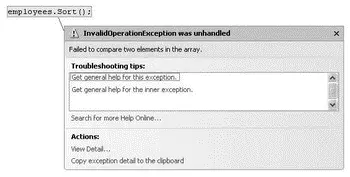
Figure 13-4
Читать дальшеИнтервал:
Закладка:
Похожие книги на «C# 2008 Programmer's Reference»
Представляем Вашему вниманию похожие книги на «C# 2008 Programmer's Reference» списком для выбора. Мы отобрали схожую по названию и смыслу литературу в надежде предоставить читателям больше вариантов отыскать новые, интересные, ещё непрочитанные произведения.












Обсуждение, отзывы о книге «C# 2008 Programmer's Reference» и просто собственные мнения читателей. Оставьте ваши комментарии, напишите, что Вы думаете о произведении, его смысле или главных героях. Укажите что конкретно понравилось, а что нет, и почему Вы так считаете.