Wei-Meng Lee - C# 2008 Programmer's Reference
Здесь есть возможность читать онлайн «Wei-Meng Lee - C# 2008 Programmer's Reference» весь текст электронной книги совершенно бесплатно (целиком полную версию без сокращений). В некоторых случаях можно слушать аудио, скачать через торрент в формате fb2 и присутствует краткое содержание. Город: Indianapolis, Год выпуска: 2009, ISBN: 2009, Издательство: Wiley Publishing, Inc., Жанр: Программирование, на английском языке. Описание произведения, (предисловие) а так же отзывы посетителей доступны на портале библиотеки ЛибКат.
- Название:C# 2008 Programmer's Reference
- Автор:
- Издательство:Wiley Publishing, Inc.
- Жанр:
- Год:2009
- Город:Indianapolis
- ISBN:978-0-470-28581-7
- Рейтинг книги:4 / 5. Голосов: 1
-
Избранное:Добавить в избранное
- Отзывы:
-
Ваша оценка:
C# 2008 Programmer's Reference: краткое содержание, описание и аннотация
Предлагаем к чтению аннотацию, описание, краткое содержание или предисловие (зависит от того, что написал сам автор книги «C# 2008 Programmer's Reference»). Если вы не нашли необходимую информацию о книге — напишите в комментариях, мы постараемся отыскать её.
C# 2008 Programmer's Reference — читать онлайн бесплатно полную книгу (весь текст) целиком
Ниже представлен текст книги, разбитый по страницам. Система сохранения места последней прочитанной страницы, позволяет с удобством читать онлайн бесплатно книгу «C# 2008 Programmer's Reference», без необходимости каждый раз заново искать на чём Вы остановились. Поставьте закладку, и сможете в любой момент перейти на страницу, на которой закончили чтение.
Интервал:
Закладка:
int num1, num2, result;
try {
Console.Write("Please enter the first number:");
num1 = int.Parse(Console.ReadLine());
Console.Write("Please enter the second number:");
num2 = int.Parse(Console.ReadLine());
result = num1 / num2;
Console.WriteLine("The result of {0}/{1} is {2}", num1, num2, result);
} catch (DivideByZeroException ex) {
Console.WriteLine("Division by zero error.");
} catch (FormatException ex) {
Console.WriteLine("Input error.");
} catch (Exception ex) {
Console.WriteLine(ex.Message);
}
Console.ReadLine();
}
In this program, typing in a numeric value for num1and an alphabetic character for num2produces the FormatExceptionexception, which is caught and displayed like this?
Please enter the first number:6
Please enter the second number:a
Input error.
Entering 0 for the second number throws the DivideByZeroExceptionexception, which is caught and displays a different error message:
Please enter the first number:7
Please enter the second number:0
Division by zero error.
So far, all the statements are located in the Main()function. What happens if you have a function called PerformDivision()that divides the two numbers and returns the result, like this?
class Program {
static void Main(string[] args) {
int num1, num2;
try {
Console.Write("Please enter the first number:");
num1 = int.Parse(Console.ReadLine());
Console.Write("Please enter the second number:");
num2 = int.Parse(Console.ReadLine());
Program myApp = new Program();
Console.WriteLine("The result of {0}/{1} is {2}", num1, num2,
myApp.PerformDivision(num1, num2));
} catch (DivideByZeroException ex) {
Console.WriteLine("Division by zero error.");
} catch (FormatException ex) {
Console.WriteLine("Input error.");
} catch (Exception ex) {
Console.WriteLine(ex.Message);
}
Console.ReadLine();
}
private int PerformDivision(int num1, int num2) {
return num1 / num2;
}
}
If num2is zero, an exception is raised within the PerformDivision()function. You can either catch the exception in the PerformDivision()function or catch the exception in the calling function — Main()in this case. When an exception is raised within the PerformDivision()function, the system searches the function to see if there is any catchblock for the exception. If none is found, the exception is passed up the call stack and handled by the calling function. If there is no try-catchblock in the calling function, the exception continues to be passed up the call stack again until it is handled. If no more frames exist in the call stack, the default exception handler handles the exception and your program has a runtime error.
Throwing Exceptions Using the throw Statement
Instead of waiting for the system to encounter an error and raise an exception, you can programmatically raise an exception by throwing one. Consider the following example:
private int PerformDivision(int num1, int num2) {
if (num1 == 0) throw new ArithmeticException();
if (num2 == 0) throw new DivideByZeroException();
return num1 / num2;
}
In this program, the PerformDivision()function throws an ArithmeticExceptionexception when num1is zero and it throws a DivideByZeroExceptionexception when num2is zero. Because there is no catchblock in PerformDivision(), the exception is handled by the calling Main()function. In Main(), you can catch the ArithmeticExceptionexception like this:
class Program {
static void Main(string[] args) {
int num1, num2, result;
try {
Console.Write("Please enter the first number:");
num1 = int.Parse(Console.ReadLine());
Console.Write("Please enter the second number:");
num2 = int.Parse(Console.ReadLine());
Program myApp = new Program();
Console.WriteLine("The result of {0}/{1} is {2}", num1, num2,
myApp.PerformDivision(num1, num2));
} catch (ArithmeticException ex) {
Console.WriteLine("Numerator cannot be zero.");
} catch (DivideByZeroException ex) {
Console.WriteLine("Division by zero error.");
} catch (FormatException ex) {
Console.WriteLine("Input error");
} catch (Exception ex) {
Console.WriteLine(ex.Message);
}
Console.ReadLine();
}
private int PerformDivision(int num1, int num2) {
if (num1 == 0) throw new ArithmeticException();
if (num2 == 0) throw new DivideByZeroException();
return num1 / num2;
}
}
One interesting thing about the placement of the multiple catch blocks is that you place all specific exceptions that you want to catch first before placing generic ones. Because the Exceptionclass is the base of all exception classes, it should always be placed last in a catch block so that any exception that is not caught in the previous catch blocks is always caught. In this example, when the ArithmeticExceptionexception is placed before the DivideByZeroExceptionexception, IntelliSense displays an error (see Figure 12-3).
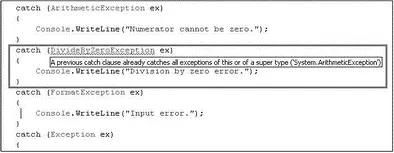
Figure 12-3
That's because the DivideByZeroExceptionis derived from the ArithmeticExceptionclass, so if there is a division-by-zero exception, the exception is always handled by the ArithmeticExceptionexception and the DivideByZeroExceptionexception is never caught. To solve this problem, you must catch the DivideByZeroExceptionexception first before catching the ArithmeticExceptionexception:
static void Main(string[] args) {
int num1, num2, result;
try {
Console.Write("Please enter the first number:");
num1 = int.Parse(Console.ReadLine());
Console.Write("Please enter the second number:");
num2 = int.Parse(Console.ReadLine());
Program myApp = new Program();
Console.WriteLine("The result of {0}/{1} is {2}", num1, num2,
myApp.PerformDivision(num1, num2));
Интервал:
Закладка:
Похожие книги на «C# 2008 Programmer's Reference»
Представляем Вашему вниманию похожие книги на «C# 2008 Programmer's Reference» списком для выбора. Мы отобрали схожую по названию и смыслу литературу в надежде предоставить читателям больше вариантов отыскать новые, интересные, ещё непрочитанные произведения.








Обсуждение, отзывы о книге «C# 2008 Programmer's Reference» и просто собственные мнения читателей. Оставьте ваши комментарии, напишите, что Вы думаете о произведении, его смысле или главных героях. Укажите что конкретно понравилось, а что нет, и почему Вы так считаете.