Wei-Meng Lee - C# 2008 Programmer's Reference
Здесь есть возможность читать онлайн «Wei-Meng Lee - C# 2008 Programmer's Reference» весь текст электронной книги совершенно бесплатно (целиком полную версию без сокращений). В некоторых случаях можно слушать аудио, скачать через торрент в формате fb2 и присутствует краткое содержание. Город: Indianapolis, Год выпуска: 2009, ISBN: 2009, Издательство: Wiley Publishing, Inc., Жанр: Программирование, на английском языке. Описание произведения, (предисловие) а так же отзывы посетителей доступны на портале библиотеки ЛибКат.
- Название:C# 2008 Programmer's Reference
- Автор:
- Издательство:Wiley Publishing, Inc.
- Жанр:
- Год:2009
- Город:Indianapolis
- ISBN:978-0-470-28581-7
- Рейтинг книги:4 / 5. Голосов: 1
-
Избранное:Добавить в избранное
- Отзывы:
-
Ваша оценка:
C# 2008 Programmer's Reference: краткое содержание, описание и аннотация
Предлагаем к чтению аннотацию, описание, краткое содержание или предисловие (зависит от того, что написал сам автор книги «C# 2008 Programmer's Reference»). Если вы не нашли необходимую информацию о книге — напишите в комментариях, мы постараемся отыскать её.
C# 2008 Programmer's Reference — читать онлайн бесплатно полную книгу (весь текст) целиком
Ниже представлен текст книги, разбитый по страницам. Система сохранения места последней прочитанной страницы, позволяет с удобством читать онлайн бесплатно книгу «C# 2008 Programmer's Reference», без необходимости каждый раз заново искать на чём Вы остановились. Поставьте закладку, и сможете в любой момент перейти на страницу, на которой закончили чтение.
Интервал:
Закладка:
num2 = int.Parse(Console.ReadLine());
result = num1 / num2;
Console.WriteLine("The result of {0}/{1} is {2}", num1, num2, result);
Console.ReadLine();
}
}
}
In this example, there are several opportunities for exceptions to occur:
□ If the user enters a noninteger value for num1or num2.
□ If the user enters a non-numeric value for num1and num2.
□ If num2is zero, resulting in a division by zero error.
Figure 12-1 shows the program halting abruptly when the user enters 3.5 for num1.
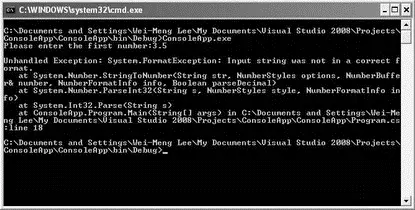
Figure 12-1
Hence, you need to anticipate all the possible scenarios and handle the exceptions gracefully.
Handling Exceptions Using the try-catch Statement
In C#, you can use the try-catchstatement to enclose a block of code statements that may potentially cause exceptions to be raised. You enclose these statements within the catch block and that block to catch the different types of exceptions that may occur.
Using the previous example, you can enclose the statements that ask the user to input num1and num2and then performs the division within a tryblock. You then use the catchblock to catch possible exceptions, like this:
static void Main(string[] args) {
int num1, num2, result;
try {
Console.Write("Please enter the first number:");
num1 = int.Parse(Console.ReadLine());
Console.Write("Please enter the second number:");
num2 = int.Parse(Console.ReadLine());
result = num1 / num2;
Console.WriteLine("The result of {0}/{1} is {2}", num1, num2, result);
} catch (Exception ex) {
Console.WriteLine(ex.Message);
}
Console.ReadLine();
}
The Exceptionclass is the base class for all exceptions; that is, it catches all the various types of exceptions. The class contains the details of the exception that occurred, and includes a number of properties that help identify the code location, the type, the help file, and the reason for the exception. The following table describes these properties.
| Property | Description |
|---|---|
Data |
Gets a collection of key/value pairs that provide additional user-defined information about the exception. |
HelpLink |
Gets or sets a link to the help file associated with this exception. |
HResult |
Gets or sets HRESULT, a coded numerical value that is assigned to a specific exception. |
InnerException |
Gets the Exceptioninstance that caused the current exception. |
Message |
Gets a message that describes the current exception. |
Source |
Gets or sets the name of the application or the object that causes the error. |
StackTrace |
Gets a string representation of the frames on the call stack at the time the current exception was thrown. |
TargetSite |
Gets the method that throws the current exception. |
In the preceding program, if you type in a numeric value for num1and then an alphabetical character for num2, the exception is caught and displayed like this:
Please enter the first number:6
Please enter the second number:a
Input string was not in a correct format.
If, though, you enter 0 for the second number, you get a different description for the error:
Please enter the first number:7
Please enter the second number:0
Attempted to divide by zero.
Notice that two different types of exceptions are caught using the same Exceptionclass. The description of the exception is contained within the Messageproperty of the Exceptionclass.
You can use the ToString()method of the Exceptionclass to retrieve more details about the exception, such as the description of the exception as well as the stack trace.
However, there are cases where you would like to print your own custom error messages for the different types of exceptions. Using the preceding code, you would not be able to do that — you would need a much finer way to catch the different types of possible exceptions.
To know the different types of exceptions that your program can cause (such as entering "a" for num1or division by zero), you can set a breakpoint at a line within the catchblock and try entering different values. When an exception is raised during runtime, IntelliSense tells you the error and the type of the exception raised. Figure 12-2 shows that the FormatExceptionexception is raised when you enter a for num1.
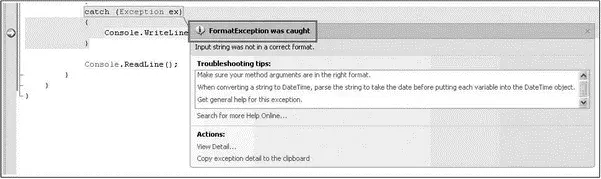
Figure 12-2
If you are not sure what type of exception your program is going to raise during runtime, it is always safe to use the base Exceptionclass. If not — if the exception that is raised does not match the exception you are trying to catch — a runtime error will occur. Here's an example:
static void Main(string[] args) {
int num1, num2, result;
try {
Console.Write("Please enter the first number:");
num1 = int.Parse(Console.ReadLine());
Console.Write("Please enter the second number:");
num2 = int.Parse(Console.ReadLine());
result = num1 / num2;
Console.WriteLine("The result of {0}/{1} is {2}", num1, num2, result);
} catch (DivideByZeroException ex) {
Console.WriteLine(ex.Message);
}
Console.ReadLine();
}
If a division-by-zero exception occurs (entering 0 for num2), the exception is caught. However, if you enter an alphabetic character for num1or num2, a FormatExceptionexception is raised. And because you are only catching the DivideByZeroExceptionexception, this exception goes unhandled and a runtime error results.
Handling Multiple Exceptions
To handle different types of exceptions, you can have one or more catchblocks in the try-catchstatement. The following example shows how you can catch three different exceptions:
□ DivideByZeroException— Thrown when there is an attempt to divide an integral or decimal value by zero.
□ FormatException— Thrown when the format of an argument does not meet the parameter specifications of the invoked method.
□ Exception— Represents errors that occur during application execution.
This example handles the three different exceptions and then prints out a custom error message:
static void Main(string[] args) {
Интервал:
Закладка:
Похожие книги на «C# 2008 Programmer's Reference»
Представляем Вашему вниманию похожие книги на «C# 2008 Programmer's Reference» списком для выбора. Мы отобрали схожую по названию и смыслу литературу в надежде предоставить читателям больше вариантов отыскать новые, интересные, ещё непрочитанные произведения.








Обсуждение, отзывы о книге «C# 2008 Programmer's Reference» и просто собственные мнения читателей. Оставьте ваши комментарии, напишите, что Вы думаете о произведении, его смысле или главных героях. Укажите что конкретно понравилось, а что нет, и почему Вы так считаете.