Wei-Meng Lee - C# 2008 Programmer's Reference
Здесь есть возможность читать онлайн «Wei-Meng Lee - C# 2008 Programmer's Reference» весь текст электронной книги совершенно бесплатно (целиком полную версию без сокращений). В некоторых случаях можно слушать аудио, скачать через торрент в формате fb2 и присутствует краткое содержание. Город: Indianapolis, Год выпуска: 2009, ISBN: 2009, Издательство: Wiley Publishing, Inc., Жанр: Программирование, на английском языке. Описание произведения, (предисловие) а так же отзывы посетителей доступны на портале библиотеки ЛибКат.
- Название:C# 2008 Programmer's Reference
- Автор:
- Издательство:Wiley Publishing, Inc.
- Жанр:
- Год:2009
- Город:Indianapolis
- ISBN:978-0-470-28581-7
- Рейтинг книги:4 / 5. Голосов: 1
-
Избранное:Добавить в избранное
- Отзывы:
-
Ваша оценка:
C# 2008 Programmer's Reference: краткое содержание, описание и аннотация
Предлагаем к чтению аннотацию, описание, краткое содержание или предисловие (зависит от того, что написал сам автор книги «C# 2008 Programmer's Reference»). Если вы не нашли необходимую информацию о книге — напишите в комментариях, мы постараемся отыскать её.
C# 2008 Programmer's Reference — читать онлайн бесплатно полную книгу (весь текст) целиком
Ниже представлен текст книги, разбитый по страницам. Система сохранения места последней прочитанной страницы, позволяет с удобством читать онлайн бесплатно книгу «C# 2008 Programmer's Reference», без необходимости каждый раз заново искать на чём Вы остановились. Поставьте закладку, и сможете в любой момент перейти на страницу, на которой закончили чтение.
Интервал:
Закладка:
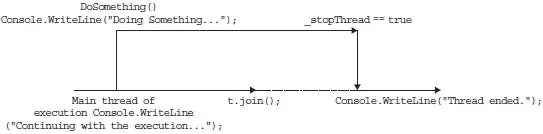
Figure 10-4
Passing Parameters to Threads
In the past few examples, you've seen how to create a thread using the ThreadStartdelegate to point to a method. So far, though, the method that you have been pointing to does not have any parameters:
static void DoSomething() {
...
...
}
What if the function you want to invoke as a thread has a parameter? In that case, you have two choices:
□ Wrap the function inside a class, and pass in the parameter via a property.
□ Use the ParameterizedThreadStartdelegate instead of the ThreadStartdelegate.
Using the same example, the first choice is to wrap the DoSomething() method as a class and then expose a property to take in the parameter value:
class Program {
static void Main(string[] args) {
SomeClass sc = new SomeClass();
sc.msg = "useful";
Thread t = new Thread(new ThreadStart(sc.DoSomething));
t.Start();
}
}
class SomeClass {
public string msg { get; set; }
public void DoSomething() {
try {
while (true) {
Console.WriteLine("Doing something...{0}", msg);
}
} catch (ThreadAbortException ex) {
Console.WriteLine(ex.Message);
} finally {
//---clean up your resources here---
}
}
}
In this example, you create a thread for the DoSomething()method by creating a new instance of the SomeClassclass and then passing in the value through the msg property.
For the second choice, you use the ParameterizedThreadStartdelegate instead of the ThreadStartdelegate. The ParameterizedThreadStartdelegate takes a parameter of type object, so if the function that you want to invoke as a thread has a parameter, that parameter must be of type object.
To see how to use the ParameterizedThreadStartdelegate, modify the DoSomething()function by adding a parameter:
static void DoSomething(object msg) {
try {
while (true) {
Console.WriteLine("Doing something...{0}", msg);
}
} catch (ThreadAbortException ex) {
Console.WriteLine(ex.Message);
} finally {
//---clean up your resources here---
}
}
To invoke DoSomething()as a thread and pass it a parameter, you use the ParameterizedThreadStartdelegate as follows:
static void Main(string[] args) {
Thread t = new Thread(new ParameterizedThreadStart(DoSomething));
t.Start("useful");
Console.WriteLine("Continuing with the execution...");
...
The argument to pass to the function is passed in the Start()method.
Thread Synchronization
Multithreading enables you to have several threads of execution running at the same time. However, when a number of different threads run at the same time, they all compete for the same set of resources, so there must be a mechanism to ensure synchronization and communication among threads.
One key problem with multithreading is thread safety. Consider the following subroutine:
static void IncrementVar() {
_value += 1;
}
If two threads execute the same routine at the same time, it is possible that _valuevariable will not be incremented correctly. One thread may read the value for _valueand increment the value by 1. Before the incremented value can be updated, another thread may read the old value and increment it. In the end, _valueis incremented only once. For instances like this, it is important that when _valueis incremented, no other threads can access the region of the code that is doing the incrementing. You accomplish that by locking all other threads during an incrementation.
In C#, you can use the following ways to synchronize your threads:
□ The Interlockedclass
□ The C# lockkeyword
□ The Monitorclass
The following sections discuss each of these.
Using Interlocked Class
Because incrementing and decrementing are such common operations in programming, the .NET Framework class library provides the Interlockedclass for performing atomic operations for variables that are shared by multiple threads. You can rewrite the preceding example using the Increment() method from the static Interlocked class:
static void IncrementVar() {
Interlocked.Increment(ref _value);
}
You need to pass in the variable to be incremented by reference to the Increment()method. When a thread encounters the Increment()statement, all other threads executing the same statement must wait until the incrementing is done.
The Interlockedclass also includes the Decrement()class that, as its name implies, decrements the specified variable by one.
Using C# Lock
The Interlockedclass is useful when you are performing atomic increment or decrement operations. What happens if you have multiple statements that you need to perform atomically? Take a look at the following program:
class Program {
//---initial balance amount---
static int balance = 500;
static void Main(string[] args) {
Thread t1 = new Thread(new ThreadStart(Debit));
t1.Start();
Thread t2 = new Thread(new ThreadStart(Credit));
t2.Start();
Console.ReadLine();
}
static void Credit() {
//---credit 1500---
for (int i = 0; i < 15; i++) {
balance += 100;
Console.WriteLine("After crediting, balance is {0}", balance);
}
}
static void Debit() {
//---debit 1000---
for (int i = 0; i < 10; i++) {
balance -= 100;
Console.WriteLine("After debiting, balance is {0}", balance);
}
}
}
Here two separate threads are trying to modify the value of balance. The Credit()function increments balanceby 1500 in 15 steps of 100 each, and the Debit()function decrements balance by 1000 in 10 steps of 100 each. After each crediting or debiting you also print out the value of balance. With the two threads executing in parallel, it is highly probably that different threads may execute different parts of the functions at the same time, resulting in the inconsistent value of the balancevariable.
Figure 10-5 shows one possible outcome of the execution. Notice that some of the lines showing the balance amount are inconsistent — the first two lines show that after crediting twice, the balance is still 500, and further down the balance jumps from 1800 to 400 and then back to 1700. In a correctly working scenario, the balance amount always reflects the amount credited or debited. For example, if the balance is 500, and 100 is credited, the balance should be 600. To ensure that crediting and debiting work correctly, you need to obtain a mutually exclusive lock on the block of code performing the crediting or debiting. A mutually exclusive lock means that once a thread is executing a block of code that is locked, other threads that also want to execute that code block will have to wait.
Читать дальшеИнтервал:
Закладка:
Похожие книги на «C# 2008 Programmer's Reference»
Представляем Вашему вниманию похожие книги на «C# 2008 Programmer's Reference» списком для выбора. Мы отобрали схожую по названию и смыслу литературу в надежде предоставить читателям больше вариантов отыскать новые, интересные, ещё непрочитанные произведения.









Обсуждение, отзывы о книге «C# 2008 Programmer's Reference» и просто собственные мнения читателей. Оставьте ваши комментарии, напишите, что Вы думаете о произведении, его смысле или главных героях. Укажите что конкретно понравилось, а что нет, и почему Вы так считаете.