Mark Murphy - Beginning Android
Здесь есть возможность читать онлайн «Mark Murphy - Beginning Android» весь текст электронной книги совершенно бесплатно (целиком полную версию без сокращений). В некоторых случаях можно слушать аудио, скачать через торрент в формате fb2 и присутствует краткое содержание. Город: New York, Год выпуска: 2009, ISBN: 2009, Издательство: Apress, Жанр: Программирование, на английском языке. Описание произведения, (предисловие) а так же отзывы посетителей доступны на портале библиотеки ЛибКат.
- Название:Beginning Android
- Автор:
- Издательство:Apress
- Жанр:
- Год:2009
- Город:New York
- ISBN:978-1-4302-2420-4
- Рейтинг книги:3 / 5. Голосов: 1
-
Избранное:Добавить в избранное
- Отзывы:
-
Ваша оценка:
Beginning Android: краткое содержание, описание и аннотация
Предлагаем к чтению аннотацию, описание, краткое содержание или предисловие (зависит от того, что написал сам автор книги «Beginning Android»). Если вы не нашли необходимую информацию о книге — напишите в комментариях, мы постараемся отыскать её.
Dear Reader,
First, welcome to the world of Android! We’re entering a new era of mobile application development, one marked by open platforms and open source, to take ‘walled gardens’ and make them green houses for any and all to participate in. Android is relatively easy for developers, and I believe that this innovation will help generate a large ecosystem of developers and consumers within a very short time. This means that budding developers such as yourself will have many opportunities to design and build your own applications and you’ll have a huge and hungry customer base.
Second, welcome to the book! Its purpose is to start you on your way with building Android applications, and to help you master the learning curve. Android is already a rich framework, comparable in many ways to the richness Android of desktop Java environments. This means that there is a lot of cool stuff for you to pick up along your journey in order to create the slickest, most useful apps Android you can imagine.
The source code for the code samples in this book is all available from the Apress site, so you can stay as hands-on and practical as you like while I introduce you to the core of Android, and invite you to experiment with the various classes and APIs we’ll be looking at. By the time you’ve finished this book, you’ll be creating your own Android applications and asking yourself what your next great application will be…!
Enjoy! Mark Murphy
Beginning Android — читать онлайн бесплатно полную книгу (весь текст) целиком
Ниже представлен текст книги, разбитый по страницам. Система сохранения места последней прочитанной страницы, позволяет с удобством читать онлайн бесплатно книгу «Beginning Android», без необходимости каждый раз заново искать на чём Вы остановились. Поставьте закладку, и сможете в любой момент перейти на страницу, на которой закончили чтение.
Интервал:
Закладка:
Intent i = new Intent(Intent.ACTION_PICK,
Uri. parse(type. getText(). toString()));
startActivityForResult(i, PICK_REQUEST);
}
});
}
@Override
protectedvoid onActivityResult(int requestCode, int resultCode,
Intent data) {
if(requestCode==PICK_REQUEST) {
if(resultCode==RESULT_OK) {
startActivity( new Intent(Intent.ACTION_VIEW,
data. getData()));
}
}
}
}
The result: the user chooses a collection (Figure 25-1), picks a piece of content (Figure 25-2), and views it (Figure 25-3).
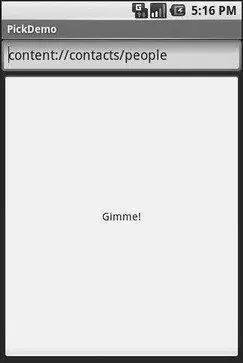
Figure 25-1. The PickDemo sample application, as initially launched
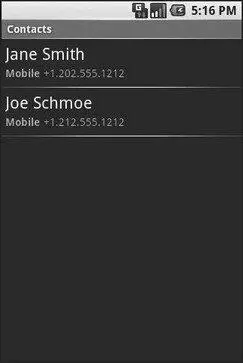
Figure 25-2. The same application, after the user has clicked the Gimme! button, showing the list of available people

Figure 25-3. A view of a contact, launched by PickDemo after the user has chosen one of the people from the pick list
Would You Like to See the Menu?
Another way to give the user ways to take actions on a piece of content, without you knowing what actions are possible, is to inject a set of menu choices into the options menu via addIntentOptions(). This method, available on Menu, takes an Intentand other parameters and fills in a set of menu choices on the Menu instance, each representing one possible action. Choosing one of those menu choices spawns the associated activity.
The canonical example of using addIntentOptions()illustrates another flavor of having a piece of content and not knowing the actions that can be taken. In the previous example, showing ActivityAdapter, the content was from some other Android application, and we know nothing about it. It is also possible, though, that we know full well what the content is — it’s ours. However, Android applications are perfectly capable of adding new actions to existing content types, so even though you wrote your application and know what you expect to be done with your content, there may be other options you are unaware of that are available to users.
For example, imagine the tagging sub-system mentioned in the introduction to this chapter. It would be very annoying to users if every time they wanted to tag a piece of content, they had to go to a separate tagging tool then turn around and pick the content they just had been working on (if that is even technically possible) before associating tags with it. Instead they would probably prefer a menu choice in the content’s own “home” activity where they can indicate they want to tag it, which leads them to the set-a-tag activity and tells that activity what content should get tagged.
To accomplish this, the tagging sub-system should set up an Intent filter, supporting any piece of content with its own action (e.g., ACTION_TAG) and a category of CATEGORY_ALTERNATIVE, which is the convention for one application adding actions to another application’s content.
If you want to write activities that are aware of possible add-ons like tagging, you should use addIntentOptions()to add those add-ons’ actions to your options menu, such as the following:
Intent intent = new Intent( null, myContentUri);
intent. addCategory(Intent.ALTERNATIVE_CATEGORY);
menu. addIntentOptions(Menu.ALTERNATIVE, 0,
new ComponentName( this, MyActivity. class), null, intent, 0, null);
Here, myContentUriis the content Uriof whatever is being viewed by the user in this activity, MyActivityis the name of the activity class, and menuis the menu being modified.
In this case, the Intent we are using to pick actions from requires that appropriate Intentreceivers support the CATEGORY_ALTERNATIVE. Then we add the options to the menu with addIntentOptions()and the following parameters:
• The sort position for this set of menu choices, typically set to 0 (which appear in the order added to the menu) or ALTERNATIVE(which appear after other menu choices).
• A unique number for this set of menu choices, or 0 if you do not need a number.
• A ComponentNameinstance representing the activity that is populating its menu — this is used to filter out the activity’s own actions so the activity can handle its own actions as it sees fit.
• An array of Intentinstances that are the “specific” matches — any actions matching those Intents are shown in the menu before any other possible actions.
• The Intentfor which you want the available actions.
• A set of flags. The only one of likely relevance is represented as MATCH_DEFAULT_ONLY, which means matching actions must also implement the DEFAULT_CATEGORYcategory. If you do not need this, use a value of 0 for the flags.
• An array of Menu.Items, which will hold the menu items matching the array of Intentinstances supplied as the “specifics,” or nullif you do not need those items (or are not using “specifics”).
Asking Around
Both the ActivityAdapterfamily and addIntentOptions()use queryIntentActivityOptions()for the “heavy lifting” of finding possible actions. The queryIntentActivityOptions()method is implemented on PackageManager, which is available to your activity via getPackageManager().
The queryIntentActivityOptions()method takes some of the same parameters as does addIntentOptions(), notably the caller ComponentName, the “specifics” array of Intentinstances, the overall Intentrepresenting the actions you are seeking, and the set of flags. It returns a Listof Intent instances matching the stated criteria, with the “specifics” ones first.
If you would like to offer alternative actions to users, but by means other than addIntentOptions(), you could call queryIntentActivityOptions(), get the Intentinstances, then use them to populate some other user interface (e.g., a toolbar).
CHAPTER 26
Handling Rotation
Some Android handsets, like the T-Mobile G1, offer a slide-out keyboard that triggers rotating the screen from portrait to landscape. Other handsets might use accelerometers to determine screen rotation, like the iPhone does. As a result, it is reasonable to assume that switching from portrait to landscape and back again may be something your users will look to do.
Читать дальшеИнтервал:
Закладка:
Похожие книги на «Beginning Android»
Представляем Вашему вниманию похожие книги на «Beginning Android» списком для выбора. Мы отобрали схожую по названию и смыслу литературу в надежде предоставить читателям больше вариантов отыскать новые, интересные, ещё непрочитанные произведения.











Обсуждение, отзывы о книге «Beginning Android» и просто собственные мнения читателей. Оставьте ваши комментарии, напишите, что Вы думаете о произведении, его смысле или главных героях. Укажите что конкретно понравилось, а что нет, и почему Вы так считаете.