Christopher Hallinan - Embedded Linux Primer - A Practical, Real-World Approach
Здесь есть возможность читать онлайн «Christopher Hallinan - Embedded Linux Primer - A Practical, Real-World Approach» весь текст электронной книги совершенно бесплатно (целиком полную версию без сокращений). В некоторых случаях можно слушать аудио, скачать через торрент в формате fb2 и присутствует краткое содержание. Год выпуска: 2006, ISBN: 2006, Издательство: Prentice Hall, Жанр: ОС и Сети, на английском языке. Описание произведения, (предисловие) а так же отзывы посетителей доступны на портале библиотеки ЛибКат.

- Название:Embedded Linux Primer: A Practical, Real-World Approach
- Автор:
- Издательство:Prentice Hall
- Жанр:
- Год:2006
- ISBN:978-0-13-167984-9
- Рейтинг книги:4 / 5. Голосов: 1
-
Избранное:Добавить в избранное
- Отзывы:
-
Ваша оценка:
Embedded Linux Primer: A Practical, Real-World Approach: краткое содержание, описание и аннотация
Предлагаем к чтению аннотацию, описание, краткое содержание или предисловие (зависит от того, что написал сам автор книги «Embedded Linux Primer: A Practical, Real-World Approach»). Если вы не нашли необходимую информацию о книге — напишите в комментариях, мы постараемся отыскать её.
This book brings together indispensable knowledge for building efficient, high-value, Linux-based embedded products: information that has never been assembled in one place before. Drawing on years of experience as an embedded Linux consultant and field application engineer, Christopher Hallinan offers solutions for the specific technical issues you're most likely to face, demonstrates how to build an effective embedded Linux environment, and shows how to use it as productively as possible.
Hallinan begins by touring a typical Linux-based embedded system, introducing key concepts and components, and calling attention to differences between Linux and traditional embedded environments. Writing from the embedded developer's viewpoint, he thoroughly addresses issues ranging from kernel building and initialization to bootloaders, device drivers to file systems.
Hallinan thoroughly covers the increasingly popular BusyBox utilities; presents a step-by-step walkthrough of porting Linux to custom boards; and introduces real-time configuration via CONFIG_RT--one of today's most exciting developments in embedded Linux. You'll find especially detailed coverage of using development tools to analyze and debug embedded systems--including the art of kernel debugging.
• Compare leading embedded Linux processors
• Understand the details of the Linux kernel initialization process
• Learn about the special role of bootloaders in embedded Linux systems, with specific emphasis on U-Boot
• Use embedded Linux file systems, including JFFS2--with detailed guidelines for building Flash-resident file system images
• Understand the Memory Technology Devices subsystem for flash (and other) memory devices
• Master gdb, KGDB, and hardware JTAG debugging
• Learn many tips and techniques for debugging within the Linux kernel
• Maximize your productivity in cross-development environments
• Prepare your entire development environment, including TFTP, DHCP, and NFS target servers
• Configure, build, and initialize BusyBox to support your unique requirements
Embedded Linux Primer: A Practical, Real-World Approach — читать онлайн бесплатно полную книгу (весь текст) целиком
Ниже представлен текст книги, разбитый по страницам. Система сохранения места последней прочитанной страницы, позволяет с удобством читать онлайн бесплатно книгу «Embedded Linux Primer: A Practical, Real-World Approach», без необходимости каждый раз заново искать на чём Вы остановились. Поставьте закладку, и сможете в любой момент перейти на страницу, на которой закончили чтение.
Интервал:
Закладка:
BusyBox is modular and highly configurable, and can be tailored to suit your particular requirements. The package includes a configuration utility similar to that used to configure the Linux kernel and will, therefore, seem quite familiar.
The commands in BusyBox are generally simpler implementations than their full-blown counterparts. In some cases, only a subset of the usual command line options is supported. In practice, however, you will find that the BusyBox subset of command functionality is more than sufficient for most general embedded requirements.
11.1.1. BusyBox is Easy
If you are able to configure and build the Linux kernel, you will find BusyBox very straightforward to configure, build, and install. The steps are similar:
1. Execute a configuration utility and enable your choice of features
2. Run make dep to build a dependency tree
3. Run make to build the package
4. Install the binary and a series of symbolic links [77] We cover the details of symbolic links shortly.
on your target system
You can build and install BusyBox on your development workstation or your target embedded system. BusyBox works equally well in both environments. However, you must take care when installing on your development workstation that you keep it isolated in a working directory, to avoid overwriting your system's startup files or primary utilities.
11.2. BusyBox Configuration
To initiate the BusyBox configuration, the command is the same as that used with the Linux kernel for the ncurses library-based configuration utility:
$ make menuconfig
Figure 11-1 shows the top-level BusyBox configuration.
Figure 11-1. Top-Level BusyBox Configuration menu
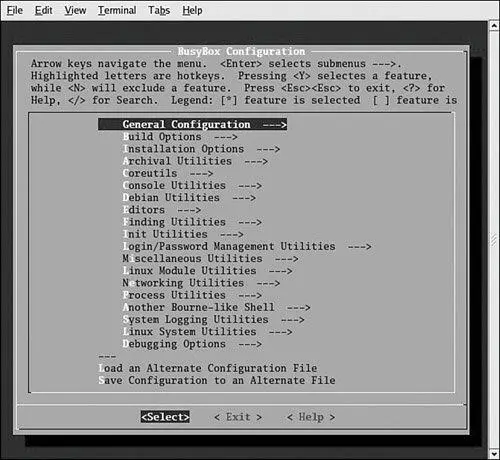
Space does not permit coverage of each configuration option. However, some of the options deserve mention. Some of the more important BusyBox configuration options are found under Build Options. Here you will find configuration options necessary to cross-compile the BusyBox application. Listing 11-1 details the options found under BuildOptions in a recent BusyBox snapshot. Select Build Options from the top-level BusyBox configuration utility to navigate to this screen.
Listing 11-1. BusyBox Build Options
[ ] Build BusyBox as a static binary (no shared libs)
[ ] Build with Large File Support (for accessing files > 2 GB)
[ ] Do you want to build BusyBox with a Cross Compiler?
() Any extra CFLAGS options for the compiler?
The first option is useful for building very minimal embedded systems. It allows BusyBox to be compiled and linked statically so that no dynamically loaded libraries (libc-2.3.3.so, for example) are required at runtime on the target system. Without this option, BusyBox requires some libraries so it can run. We can easily determine what libraries BusyBox (or any other binary) requires on our target system by using the ldd command. Listing 11-2 contains the output as displayed on my desktop Linux workstation.
Listing 11-2. BusyBox Library Dependencies
$ ldd busybox
linux-gate.so.1 => (0xffffe000)
libc.so.6=> /lib/tls/libc.so.6 (0x42c70000)
/lib/ld-linux.so.2=> /lib/ld-linux.so.2 (0x42c57000)
Notice that the BusyBox utility, as compiled using the default configuration, requires the three shared libraries in Listing 11-2. Had we elected to build BusyBox as a static binary, ldd would simply issue a message telling us that the BusyBox binary is not a dynamic executable. In other words, it requires no shared libraries to resolve any unresolved dependencies in the executable. Static linking yields a smaller footprint on a root file system because no shared libraries are required. However, building an embedded application without shared libraries means that you have none of the familiar C library functions available to your applications.
We cover the other options from Listing 11-1 in the next section.
11.2.1. Cross-Compiling BusyBox
As mentioned at the beginning of the chapter, the authors of BusyBox intended the package to be used in a cross-development environment, so building BusyBox in such an environment is quite easy. In most cases, the only requirement is to specify the prefix to the cross-compiler on your development workstation. This is specified in Build Options in the BusyBox configuration utility by selecting the option to build BusyBox with a cross-compiler. You then are presented with an option to enter the cross-compiler prefix. The prefix you enter depends on your cross-development environment. Some examples include xscale_be- or ppc-linux-. We cover this in more detail in the next chapter when we examine the embedded development environment.
The final option in Listing 11-1 is for any extra flags you might want to include on the compiler command line. These might include options for generating debug information (-g), options for setting the optimization level (-O2, for example), and other compiler options that might be unique to your particular installation and target system.
11.3. BusyBox Operation
When you build BusyBox, you end up with a binary called, you guessed it, busybox. BusyBox can be invoked from the binary name itself, but it is more usually launched via a symlink . When BusyBox is invoked without command line parameters, it produces a list of the functions that were enabled via the configuration. Listing 11-3 shows such an output (it has been formatted slightly to fit the page width).
Listing 11-3. BusyBox Usage
root@coyote # ./busybox
BusyBox v1.01 (2005.12.03-18:00+0000) multi-call binary
Usage: busybox [function] [arguments]...
or: [function] [arguments]...
BusyBox is a multi-call binary that combines many common Unix
utilities into a single executable. Most people will create a
link to busybox for each function they wish to use and BusyBox
will act like whatever it was invoked as!
Currently defined functions:
[, ash, basename, bunzip2, busybox, bzcat, cat, chgrp, chmod,
chown, chroot, chvt, clear, cmp, cp, cut, date, dd, deallocvt,
df, dirname, dmesg, du, echo, egrep, env, expr, false, fgrep,
find, free, grep, gunzip, gzip, halt, head, hexdump, hostname,
id, ifconfig, init, install, kill, killall, klogd, linuxrc, ln,
logger, ls, mkdir, mknod, mktemp, more, mount, mv, openvt, pidof,
ping, pivot_root, poweroff, ps, pwd, readlink, reboot, reset,
rm, rmdir, route, sed, sh, sleep, sort, strings, swapoff, swapon,
sync, syslogd, tail, tar, tee, test, time, touch, tr, true, tty,
umount, uname, uniq, unzip, uptime, usleep, vi, wc, wget, which,
whoami, xargs, yes, zcat
From Listing 11-3, you can see the list of functions that are enabled in this BusyBox build. They are listed in alphabetical order from ash (a shell optimized for small memory footprint) to zcat, a utility used to decompress the contents of a compressed file. This is the default set of utilities enabled in this particular BusyBox snapshot.
To invoke a particular function, execute busybox with one of the defined functions passed on the command line. Thus, to display a listing of files in the current directory, execute this command:
Читать дальшеИнтервал:
Закладка:
Похожие книги на «Embedded Linux Primer: A Practical, Real-World Approach»
Представляем Вашему вниманию похожие книги на «Embedded Linux Primer: A Practical, Real-World Approach» списком для выбора. Мы отобрали схожую по названию и смыслу литературу в надежде предоставить читателям больше вариантов отыскать новые, интересные, ещё непрочитанные произведения.










Обсуждение, отзывы о книге «Embedded Linux Primer: A Practical, Real-World Approach» и просто собственные мнения читателей. Оставьте ваши комментарии, напишите, что Вы думаете о произведении, его смысле или главных героях. Укажите что конкретно понравилось, а что нет, и почему Вы так считаете.