Wei-Meng Lee - C# 2008 Programmer's Reference
Здесь есть возможность читать онлайн «Wei-Meng Lee - C# 2008 Programmer's Reference» весь текст электронной книги совершенно бесплатно (целиком полную версию без сокращений). В некоторых случаях можно слушать аудио, скачать через торрент в формате fb2 и присутствует краткое содержание. Город: Indianapolis, Год выпуска: 2009, ISBN: 2009, Издательство: Wiley Publishing, Inc., Жанр: Программирование, на английском языке. Описание произведения, (предисловие) а так же отзывы посетителей доступны на портале библиотеки ЛибКат.
- Название:C# 2008 Programmer's Reference
- Автор:
- Издательство:Wiley Publishing, Inc.
- Жанр:
- Год:2009
- Город:Indianapolis
- ISBN:978-0-470-28581-7
- Рейтинг книги:4 / 5. Голосов: 1
-
Избранное:Добавить в избранное
- Отзывы:
-
Ваша оценка:
C# 2008 Programmer's Reference: краткое содержание, описание и аннотация
Предлагаем к чтению аннотацию, описание, краткое содержание или предисловие (зависит от того, что написал сам автор книги «C# 2008 Programmer's Reference»). Если вы не нашли необходимую информацию о книге — напишите в комментариях, мы постараемся отыскать её.
C# 2008 Programmer's Reference — читать онлайн бесплатно полную книгу (весь текст) целиком
Ниже представлен текст книги, разбитый по страницам. Система сохранения места последней прочитанной страницы, позволяет с удобством читать онлайн бесплатно книгу «C# 2008 Programmer's Reference», без необходимости каждый раз заново искать на чём Вы остановились. Поставьте закладку, и сможете в любой момент перейти на страницу, на которой закончили чтение.
Интервал:
Закладка:
///
/// The entry point for the program
///
///
static void Main(string[] args) {
Console.Write("Hello, ");
for (int i = 0; i < args.Length; i++)
Console.Write("{0} ", args[i]);
Console.Write("! This is my first C# program!");
Console.ReadLine();
return;
}
///
/// Adds two numbers and returns the result
///
/// Number 1
/// Number 2
/// Sum of Number 1 and 2
private int AddNumbers(int num1, int num2) {
//---implementations here---
}
}
}
To enable generation of the XML document containing the XML comments, right-click the project name in Solution Explorer and select Properties.
You can also generate the XML documentation file using the csc.execompiler at the command prompt using the /docoption:
csc Program.cs /doc:HelloWorld.xml
In the Build tab, tick the XML Documentation File checkbox and use the default path suggested: bin\Debug\HelloWorld.XML(see Figure 3-7).
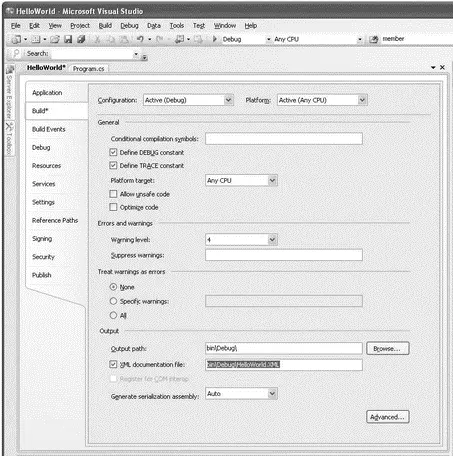
Figure 3-7
Build the project by right-clicking the project name in Solution Explorer and selecting Build.
You will now find the HelloWorld.xmlfile (see Figure 3-8) located in the bin\Debug\ folder of the project.
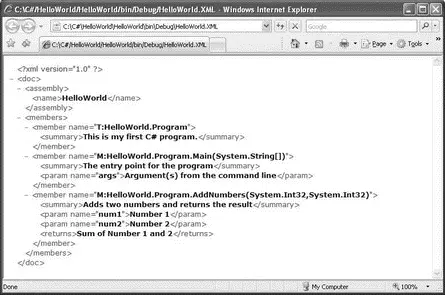
Figure 3-8
You can now convert this XML file into a MSDN-style documentation file. Appendix C shows you how to use the SandCastle tool to do this.
Data Types
C# is a strongly typed language and as such all variables and objects must have a declared data type. The data type can be one of the following:
□ Value
□ Reference
□ User-defined
□ Anonymous
You'll find more information about user-defined types in Chapter 4 and about anonymous types in Chapter 14.
Value Types
A value type variable contains the data that it is assigned. For example, when you declare an int (integer) variable and assign a value to it, the variable directly contains that value. And when you assign a value type variable to another, you make a copy of it. The following example makes this clear:
class Program {
static void Main(string[] args) {
int num1, num2;
num1 = 5;
num2 = num1;
Console.WriteLine("num1 is {0}. num2 is {1}", num1, num2);
num2 = 3;
Console.WriteLine("num1 is {0}. num2 is {1}", num1, num2);
Console.ReadLine();
return;
}
}
The output of this program is:
num1 is 5. num2 is 5
num1 is 5. num2 is 3
As you can observe, num2is initially assigned a value of num1(which is 5). When num2is later modified to become 3, the value of num1remains unchanged (it is still 5). This proves that the num1and num2each contains a copy of its own value.
Following is another example of value type. Point is a structure that represents an ordered pair of integer x and y coordinates that defines a point in a two-dimensional plane (structure is another example of value types). The Pointclass is found in the System.Drawingnamespace and hence to test the following statements you need to import the System.Drawingnamespace.
Chapter 4 discusses structures in more detail.
Point pointA, pointB;
pointA = new Point(3, 4);
pointB = pointA;
Console.WriteLine("point A is {0}. pointB is {1}",
pointA.ToString(), pointB.ToString());
pointB.X = 5;
pointB.Y = 6;
Console.WriteLine("point A is {0}. pointB is {1}",
pointA.ToString(), pointB.ToString());
These statements yield the following output:
point A is {X=3,Y=4}. pointB is {X=3,Y=4}
point A is {X=3,Y=4}. pointB is {X=5,Y=6}
As in the earlier example, changing the value of the pointB does not change the value of pointA.
The .NET Framework ships with a set of predefined C# and .NET value types. These are described in the following table.
| C# Type | .NET Framework Type | Bits | Range |
|---|---|---|---|
bool |
System.Boolean |
True or false | |
byte |
System.Byte |
8 | Unsigned 8-bit integer values from 0 to 255 |
sbyte |
System.SByte |
8 | Signed 8-bit integer values from -128 to 127 |
char |
System.Char |
16 | 16-bit Unicode character from U+0000 to U+ffff |
decimal |
System.Decimal |
128 | Signed 128-bit number from ±1.0×10 -28to ±7.9×10 28 |
double |
System.Double |
64 | Signed 64-bit floating point number; approximately from ±5.0×10 -324to ±1.7×10 308 |
float |
System.Single |
32 | Signed 32-bit floating point number; approximately from ±1.5×10 -45to ±3.4×10 38 |
int |
System.Int32 |
32 | Signed 32-bit integer number from -2,147,483,648 to 2,147,483,647 |
uint |
System.UInt32 |
32 | Unsigned 32-bit integer number from 0 to 4,294,967,295 |
long |
System.Int64 |
64 | Signed 64-bit integer number from -9,223,372,036,854,775,808 to 9,223,372,036,854,775,807 |
ulong |
System.UInt64 |
64 | Unsigned 64-bit integer number from 0 to 18,446,744,073,709,551,615 |
short |
System.Int16 |
16 | Signed 16-bit integer number from -32,768 to 32,767 |
ushort |
System.UInt16 |
16 | Unsigned 16-bit integer number from 0 to 65,535 |
To declare a variable of a predefined type, you can either use the C# type or the .NET Framework type. For example, to declare an integer variable, you can either use the int or System.Int32type, as shown here:
int num1 = 5;
//---or---
System.Int32 num2 = 5;
To get the type of a variable, use the GetType()method:
Console.WriteLine(num1.GetType()); //---System.Int32---
To get the .NET equivalent of a C# type, use the typeof()method. For example, to learn the .NET type equivalent of C#'s float type, you can use the following statements:
Type t = typeof(float);
Console.WriteLine(t.ToString()); //---System.Single---
Интервал:
Закладка:
Похожие книги на «C# 2008 Programmer's Reference»
Представляем Вашему вниманию похожие книги на «C# 2008 Programmer's Reference» списком для выбора. Мы отобрали схожую по названию и смыслу литературу в надежде предоставить читателям больше вариантов отыскать новые, интересные, ещё непрочитанные произведения.












Обсуждение, отзывы о книге «C# 2008 Programmer's Reference» и просто собственные мнения читателей. Оставьте ваши комментарии, напишите, что Вы думаете о произведении, его смысле или главных героях. Укажите что конкретно понравилось, а что нет, и почему Вы так считаете.